Young female business owner enjoys a snack with her dog nearby

Keep Your LifeWise Coverage in 2027

We look forward to working for you again. Here are some important changes.

  • Plans are available in 30 Washington counties.
  • We’re updating our systems, and everyone is receiving a new ID card and ID number.
  • We’re expanding our Cascade Select plans to Snohomish County.
  • LifeWise plans are no longer available in King County.
  • Essential Silver and grandfathered plans will be discontinued.

What to know

We're updating our member portal systems, and you'll receive a new ID number and ID card.

A new member portal account

Updated payment information

A new ID number and ID card

What to do

  • Review the renewal letter mailed by LifeWise in late October to early November.
  • The state exchange, Washington Healthplanfinder, will tell you if you need to take action to renew your plan or if your plan will renew automatically.
  • Follow all instructions provided by Washington Healthplanfinder.
  • If Healthplanfinder tells you to take action and you do not, you may not have coverage for January 1, 2027.

What to expect

Take note of these key dates, so you know what’s coming your way.

Late October to early November

Receive your annual notice in the mail, including your 2027 rate. You can also view all rates on our 2027 health plans page.

November

You will receive your December invoice. Pay by November 30. If you are enrolled in autopay, your December payment should draft on November 28. To continue to using autopay in 2027, you will need to set it up in the new member portal.
We’ve updated our member portal system. Register for a new account and sign up for autopay for 2027.

December

Your ID number is changing, and you will receive a new ID card by mail.
You will receive your January invoice with your new 2027 premium amount. If you pay online through your bank, update your payment with your new premium amount and payment address. To continue using autopay for your 2027 premiums, you must set up autopay in your new portal account by December 28, 2026.

January 1

Start using your 2027 plan. Remember, you can access your digital ID card through your secure LifeWise account, and via text by opting in to digital health messages. Sign in to your account.

2027 highlights

Kinwell Health Clinic lobby

Kinwell clinics

Access nearby primary care at Kinwell clinics throughout Washington, in-person or virtually.

Find Kinwell clinics
Kinwell services

Digital ID cards

Starting January 1, you can view, download, and print a digital ID from your LifeWise account.

  1. Sign in to your account.
  2. Choose ID card from the menu options.
  3. Print or save your digital ID card.
  4. You can also request a physical copy.

Get virtual care and 24/7 care

Need urgent or mental health care? We're here for you in 2027. Connect with experienced, board-certified doctors for urgent medical needs through Transcarent. For mental health support, explore services from Spring Health. If you're seeking help with substance use, Boulder Care is available for you. Plus, nurses at the 24-Hour NurseLine are always ready to give advice.

Digital health messages

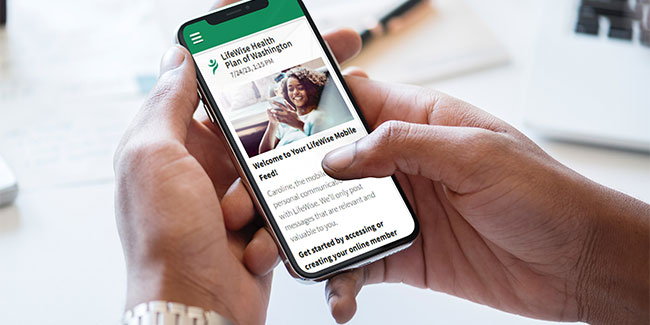
With digital health messages, you can receive important healthcare updates right to your cell phone that are personalized and secure. By opting in, you'll be able to access your ID card and personal information quickly to understand your benefits and get the most out of your plan.

Get a head start for 2027

Consider taking these two actions to make your plan even easier to use and manage. If you’ve already signed up for an online account or autopay in 2026, you need to sign up again.

 Register for your online account

Check benefits, access claims, or find a doctor—all online.

  1. Visit member.lifewisewa.com.
  2. Select "Create an account."
  3. Follow the prompts to register and create your account.*

    *Please use your Social Security number (SSN). Do not use the member ID on your current ID card as it will not work to register for the new portal. All members will also receive a new member ID number and ID card by mail in early December.

  Set up autopay

For subscribers (primary policyholders): Enroll in autopay to make paying your monthly premium simple.

  1. Sign in to your online account.
  2. Select "My Account" at the top of the page, then select "Billing and Payment, then Manage Autopay." Only the subscriber on your plan can access the "Make a Payment or Manage Autopay" button.
  3. Follow the prompts to set up your autopay for 2027.

Be confident in your 2027 coverage

Use our self-service tools to get peace of mind about your 2027 plan.

Find virtual or local network providers

Visit our Find Care page to browse your network and virtual care options. Or sign in to your account for a personalized experience.

Sign in

Check your prescription drugs

Access the 2027 prescription (Rx) formulary for your plan’s list of covered drugs.

Go to covered drugs page

Review changes and what’s new

Browse all plan features on our 2027 health plans page, or review the annual notice that was mailed to you in late October.

Go to health plans page

Need help or have questions?

LifeWise Health Plan of Washington makes it easy to renew your plan.

Contact us